Before paying
Receive with care
Keep the original, screen the boleto, invoice or contract, confirm the critical detail through another channel, and only then pay, approve or file it.
A practical guide to digital file integrity and document-fraud checks, built for Brazil’s documents
A bank slip carrying someone else’s barcode. An invoice that does not exist in the tax authority’s system. A contract nobody can match to the version that was sent. This guide shows how to check a file before you pay, sign or forward it, and how to keep what matters so you can prove it later.
No sign-up. 19 pages, 0.7 MB. Version 2, November 2026.
The PDF itself is in Portuguese (pt-BR), because it covers Brazilian documents and rules for the people who handle them. This page summarizes what applies anywhere and explains what is specific to Brazil.
Every page answers one question: what to do right now, in a few steps, for your line of work.
For each check, the guide says what it proves and what it does not. Verifying means looking for signs of a problem, not certifying that a document is genuine.
Boletos, NF-e invoices, Pix, CPF and CNPJ tax IDs, ICP-Brasil signatures, fake court notices and the LGPD.
The core idea
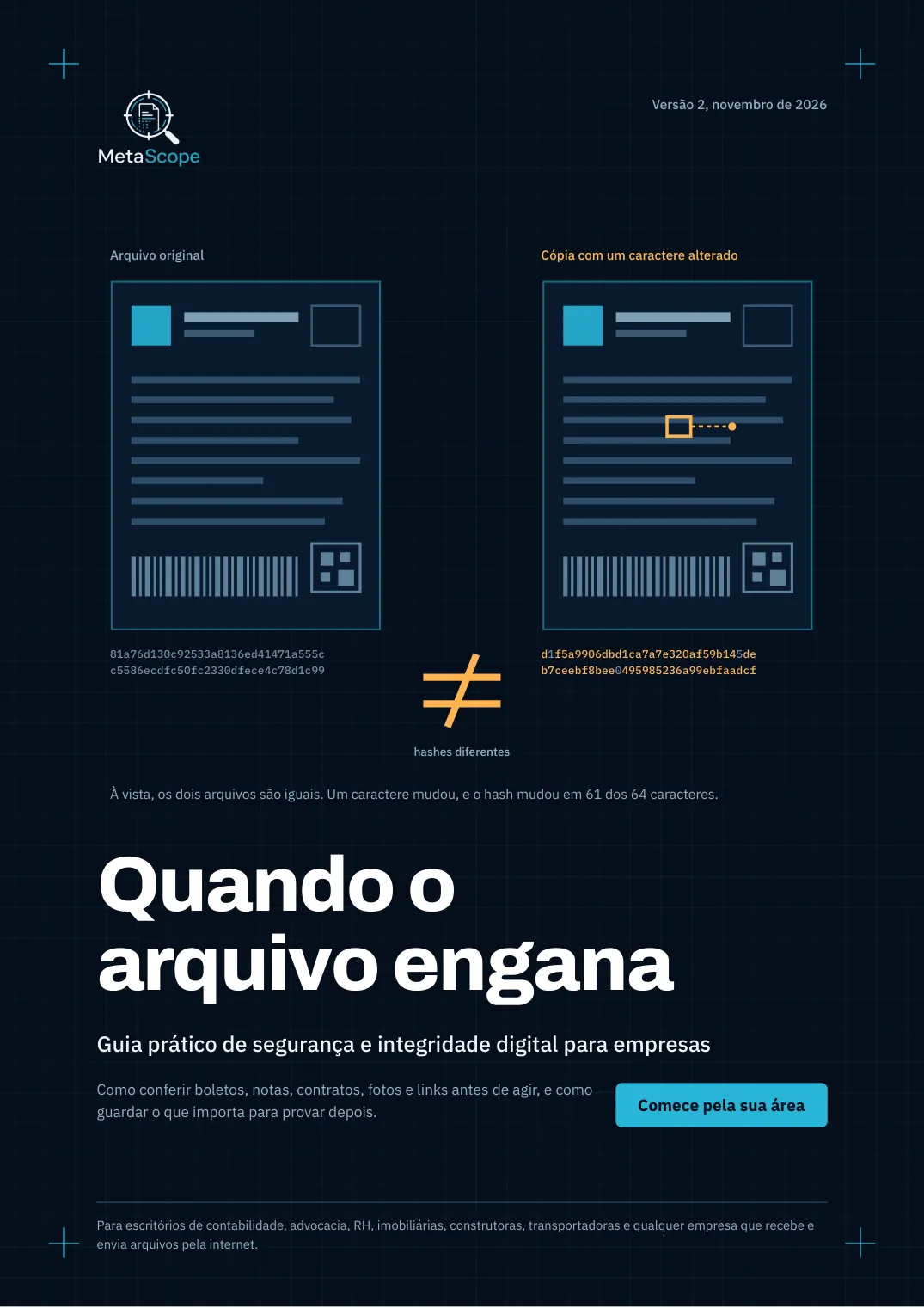
A SHA-256 hash is a file’s fingerprint: a 64-character code calculated from its content. Two files that look identical can have completely different hashes. This is how the guide teaches you to confirm that the file you received is the one that was sent. The idea works for any file, in any country.
Original file
81a76d130c92533a8136ed41471a555cc5586ecdfc50fc2330dfece4c78d1c99
Copy with one character changed
d1f5a9906dbd1ca7a7e320af59b145deb7ceebf8bee0495985236a99ebfaadcf
The file as it was generated or received. Messaging apps and email can recompress photos and strip the information hidden inside a file.
No alerts means nothing was found, not that the document is genuine. Proving requires confirming at the source.
Same hash, identical files. But a hash does not say who made the file or whether its content is true.
Built for Brazil
Fraud follows local paperwork. These are the Brazilian documents and rules the guide is built around, and what its companion tool, MetaScope, checks in each. They only apply to Brazilian documents.
| Brazilian term | What it is | What the guide covers |
|---|---|---|
| BoletoBank slip used to pay invoices, with a barcode and a typed payment line. A classic fraud target. | Bank slip used to pay invoices, with a barcode and a typed payment line. A classic fraud target. | Barcode and payment-line digits, whether the printed amount matches the code, the beneficiary’s tax ID, and bank-specific fields on known layouts. |
| Pix QR CodeBrazil’s instant-payment system. Slips often embed a Pix QR Code. | Brazil’s instant-payment system. Slips often embed a Pix QR Code. | Checks that the QR Code matches the slip, without opening its address. |
| NF-e / DANFEElectronic invoice, validated by the tax authority (SEFAZ) through a 44-digit access key, plus its printed PDF version. | Electronic invoice, validated by the tax authority (SEFAZ) through a 44-digit access key, plus its printed PDF version. | Checks the access key and the issuer’s CNPJ on the PDF. It does not query SEFAZ: confirming the key on the official portal stays with you. |
| CPF / CNPJIndividual and company tax IDs. | Individual and company tax IDs. | Beneficiary ID check and, for a CNPJ, its status in the Receita Federal public database. |
| ICP-Brasil signaturesBrazil’s public-key infrastructure for legally recognized digital signatures. The government’s ITI runs the official validator. | Brazil’s public-key infrastructure for legally recognized digital signatures. The government’s ITI runs the official validator. | Signed PDFs can be sent to the ITI validator. This is on by default and can be unticked before upload for confidential files. |
| Fake court noticesScam messages posing as a summons, with a link to a “shared folder” on a look-alike domain. | Scam messages posing as a summons, with a link to a “shared folder” on a look-alike domain. | Link check for look-alike brands, mixed alphabets, hidden destinations and domain age, without opening the page. |
| LGPDBrazil’s data-protection law, comparable in spirit to the GDPR. | Brazil’s data-protection law, comparable in spirit to the GDPR. | Flags sensitive data, such as medical certificates, that should not be uploaded without real doubt. |
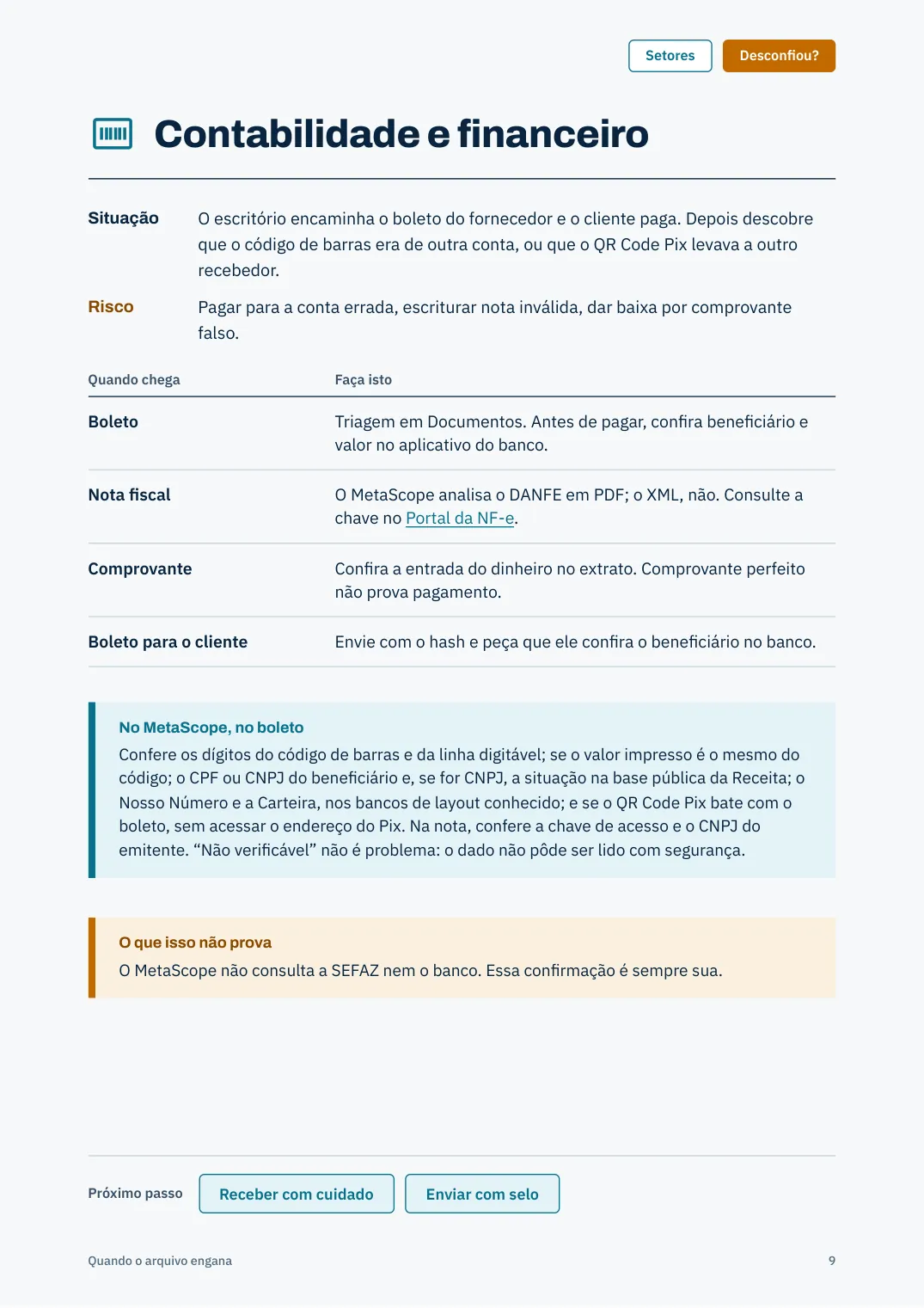
The method (hashing, confirming through an independent channel, preserving the original) works for any file anywhere. The checks above apply only to Brazilian documents.
The four workflows
The whole guide is organized around four situations that repeat in any organization.
Keep the original, screen the boleto, invoice or contract, confirm the critical detail through another channel, and only then pay, approve or file it.
Calculate the hash of the final file and send it along. The recipient checks that they received exactly what you sent.
Register contracts, inspection photos and delivery receipts so you can show, months later, that they were not changed.
Unexpected links from email, SMS and WhatsApp, fake court notices and shared folders, analyzed without opening the page.
When something looks wrong
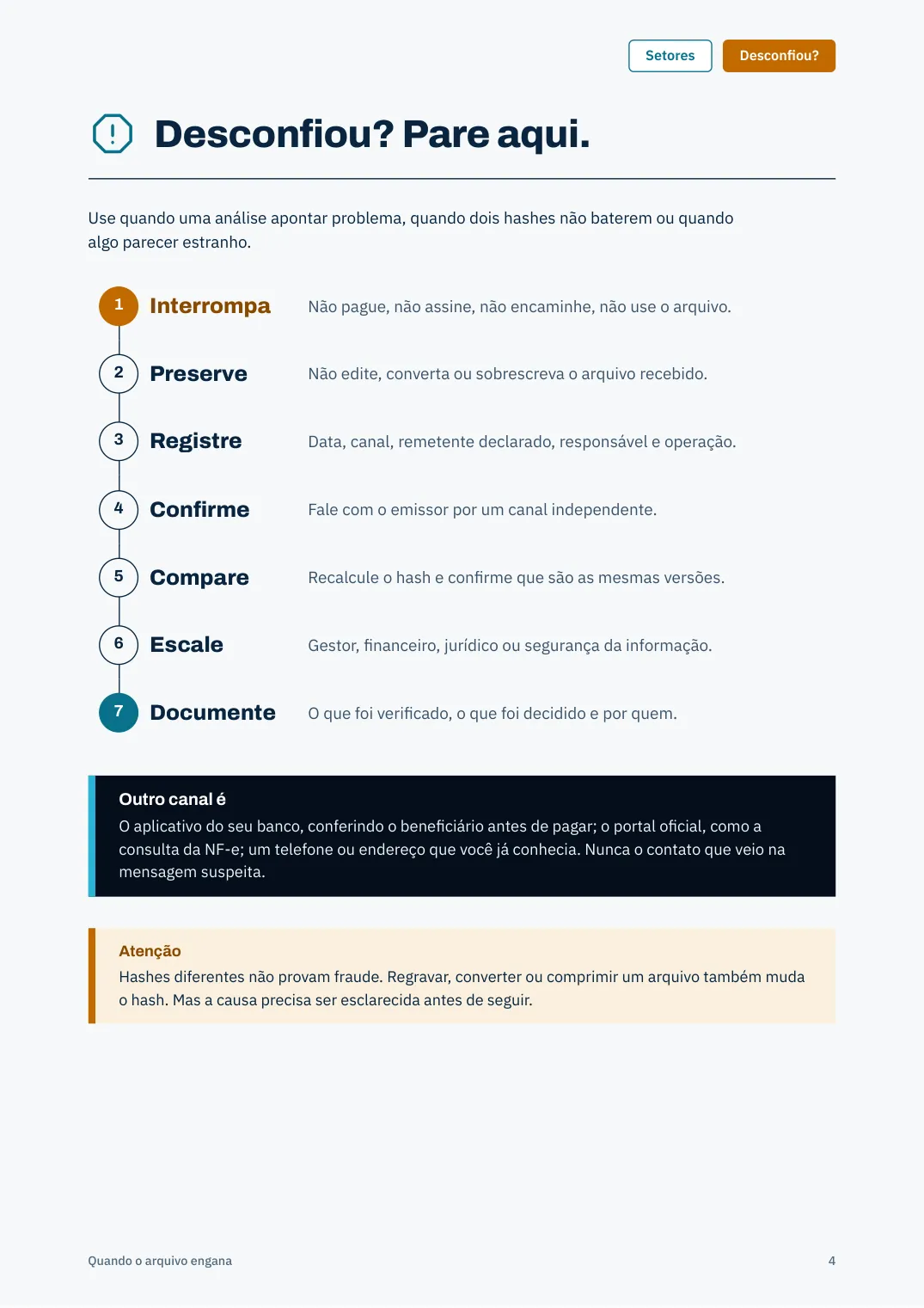
Use it when an analysis flags a problem, when two hashes do not match or when something just looks off. Seven steps, in this order.
Stop
Do not pay, sign, forward or use the file.
Preserve
Do not edit, convert or overwrite the file you received.
Record
Date, channel, claimed sender, person responsible and the transaction.
Confirm
Contact the issuer through an independent channel.
Compare
Recalculate the hash and make sure you are comparing the same versions.
Escalate
Manager, finance, legal or information security.
Document
What was checked, what was decided and by whom.
An independent channel is
Your bank’s own app, checking the beneficiary before you pay; the official portal, such as the NF-e lookup; a phone number or address you already had. Never the contact that came in the suspicious message.
Note
Different hashes do not prove fraud. Re-saving, converting or compressing a file also changes its hash. But the cause has to be explained before moving on.
Inside the PDF
Beyond the sections summarized here, the PDF has material written around Brazilian practice. It is not translated.
Accounting and finance, law, HR, and property, construction and logistics. Each lists the typical situation, the risk and what to do.
A 20-question checklist, a message template for recipients, a send-record form and a summarized internal policy.
What stays in your browser and what is uploaded, tool by tool, with a note on the LGPD.
Six things the checks do not prove, including “no alerts is not a guarantee”.
Transparency
The guide spends a full page on limits. It is what separates serious guidance from a security promise.
It shows that two files are identical. It does not show authorship, origin, truthfulness or creation date.
It records that certain hashes were declared and sealed on a date.
Scores and alerts are indications and risks, not legal decisions. When a question needs a technical conclusion, consult a qualified professional.
A consistent boleto can still be fraud. An invoice may not exist at SEFAZ. A clean link can come from someone you did not expect.
Its absence does not prove fraud, and its presence does not prove authenticity.
Not legal advice, an audit, an expert report or a certification, and it does not replace your organization’s own policies.
Privacy
The guide explains, tool by tool, what is uploaded and what stays in your browser. This is the summary.
| Tool | What happens |
|---|---|
| Academy and free tools | Run in your browser. Nothing is uploaded. |
| Guardian (integrity registry) | File contents never leave your device. The hash, name, size and type of each file are sent. |
| Technical Analysis | The file is uploaded and processed in server memory, with no AI and nothing written to disk. Videos use a temporary file that is deleted right after. |
| Digitally signed PDF | By default the whole file goes to the Brazilian government’s ITI validator. For confidential files, untick the option before uploading. |
| Links | The address text is analyzed and the domain is looked up in public records. The page is never opened. |
| Deep Research (optional, uses AI) | Sends content to OpenAI. The link address also goes to Google Web Risk. |
For each analysis, MetaScope keeps the file name, type, size, hash and a result summary. The name and summary are deleted after 12 months; the rest is kept for 5 years, as is the custody record. MetaScope Privacy Policy.
The LGPD deals with legal obligations; the guide gives technical recommendations. Decide with your legal team what may be sent to external services.
A guide about file integrity should let you check its own file. This is the SHA-256 of the PDF published on this page.
PDF SHA-256
9460c9ca5e0e5d7ac388eb2108284442fa688fc9fb0f48cc563661efe2db0c75
To calculate it on your own computer, without uploading the file anywhere:
Windows: certutil -hashfile quando-o-arquivo-engana-guia-integridade-digital.pdf SHA256
Linux or macOS: sha256sum quando-o-arquivo-engana-guia-integridade-digital.pdf
Published by
A Brazilian digital forensics platform, developed by Investigação Forense. The guide comes from hands-on work with the documents and scams that most often hit Brazilian companies.
Tales Giuliano Vieira
Forensic expert, professor and researcher in digital forensics and investigations.
It is free and the download is direct, with no sign-up. It is a 19-page PDF of 0.7 MB.
Because it covers Brazilian documents and rules, such as boletos, NF-e invoices, ICP-Brasil signatures and the LGPD, for the people who handle them. This page summarizes the parts that apply anywhere and flags the parts that are Brazil-specific.
The method is: keep the original, hash what you need to prove later, confirm critical details through an independent channel and know what a check does not prove. The document-specific checks (boleto, NF-e, ICP-Brasil, SEFAZ) only apply to Brazilian paperwork.
No. A matching hash only shows that two files are identical. It does not show who made them or whether their content is true. Proving requires confirming at the source: the bank, the official portal or the issuer.
No. It is general guidance. When a question needs a technical conclusion, the guide recommends a qualified professional. The PDF report generated by the app is not an expert report either.
It depends on the tool. The free tools run in your browser; Technical Analysis uploads the file to MetaScope, which processes it in memory. See the “What leaves your computer” table on this page and the Privacy Policy.
Bring the protocol to your team and, when you want to check a real file, open MetaScope with a free account.